
Not necessarily. Real symptoms such as shutdowns, severe drain, heat, swelling, or unreliable daily use matter along with the Battery Health percentage.
FAST REPAIR
iPhone Battery Replacement in Sacramento
HomeiPhone Battery Replacement in Sacramento
Trusted by Sacramento customers
“The workmanship was quality and professional. I’ll send everyone there in the future and the price was reasonable.”
naochea — Google reviewer
“My phone was fully functional within two hours. Highly recommended! The price is fair, not expensive like other places I called.”
Lac Dang — Google Local Guide
“Done super quickly, fair pricing, and quality customer service!”
Fast Repair customer — Google reviewer
SACRAMENTO REPAIR SHOP
Walk In or Start With an Estimate
Walk-ins are welcome at 4424 Freeport Blvd, Suite 4. You can also request an estimate before your visit.
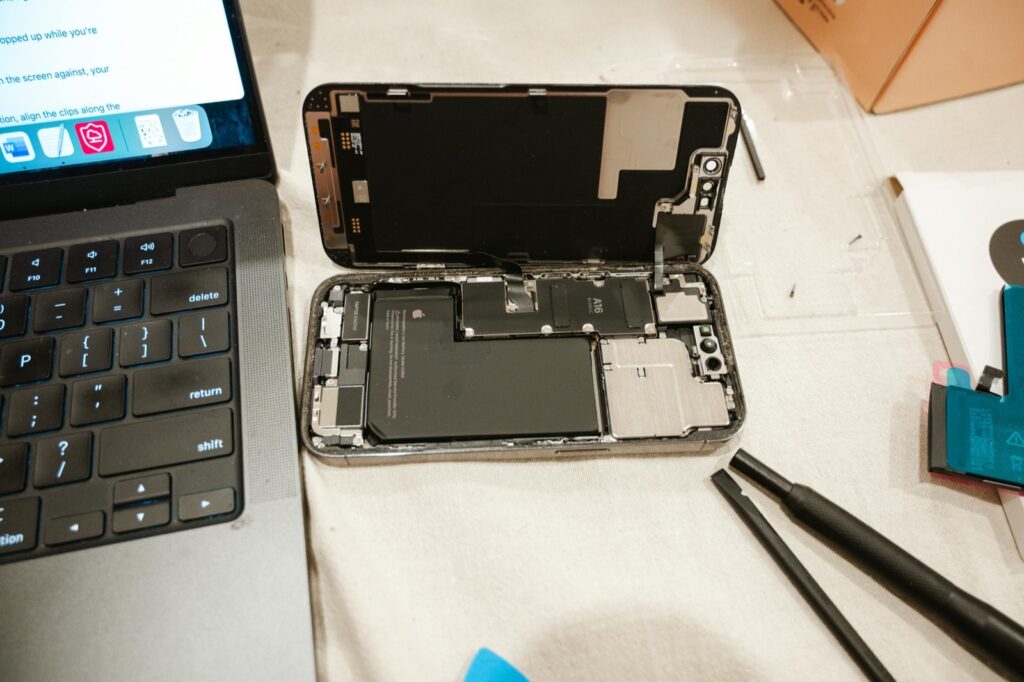
BATTERY SERVICE
iPhone Battery Replacement in Sacramento
Fast Repair diagnoses fast battery drain, unexpected shutdowns, low battery health, overheating, swelling, and performance problems before recommending replacement. We also check for charging-system or liquid-related symptoms that can look like a battery failure.
Battery & Charging Diagnosis
We confirm whether the battery is worn out or whether charging, liquid, software, or board-level symptoms are affecting performance.
Clear Replacement Recommendation
We explain the battery condition, repair option, expected timing, price, and applicable warranty before approved work begins.
WHAT WE DIAGNOSE
Common Signs of an iPhone Battery Problem
Fast Battery Drain
The charge drops much faster than normal during ordinary daily use.
Unexpected Shutdowns
The iPhone turns off before reaching zero percent or restarts under load.
Low Battery Health
Battery Health shows a service warning or noticeably reduced maximum capacity.
Heat While Charging
The phone becomes unusually warm during charging or light use.
Swollen or Lifted Screen
Battery swelling can push the display away from the frame and requires prompt inspection.
Reduced Performance
The device feels slower or struggles during tasks it previously handled normally.
DEVICE INSPECTION
What Changes the Battery Repair Path
Battery Age & Health
Battery condition, cycle history, and real-world symptoms help confirm whether replacement is appropriate.
Charging-System Symptoms
A weak cable connection, port issue, or charging-circuit fault can imitate a worn battery.
Liquid Exposure
Moisture or corrosion can create power and charging symptoms that battery replacement alone will not solve.
Model & Parts Availability
The exact iPhone model and current parts stock affect the expected turnaround.
Prior Damage or Repair
A bent frame, damaged screen, or earlier repair can change safe access and reassembly.
Battery Swelling
A swollen battery requires careful handling and may have already affected the display or frame.
DO NOT WAIT
When to Bring the iPhone In Sooner
Random Shutdowns
Repeated shutdowns can leave the phone unreliable and make important data harder to access.
Screen Is Lifting
A separating display can indicate battery swelling and should not be pressed back into place.
Percentage Jumps
Large jumps in the battery percentage can indicate unstable battery reporting or power delivery.
Unusual Overheating
Persistent heat during charging or ordinary use should be inspected before continued use.
Very Short Runtime
A phone that no longer lasts through normal use may be ready for replacement after diagnosis.
Charging Becomes Unreliable
Slow or intermittent charging can involve the battery, port, cable, or charging circuit.
FOUR CLEAR STEPS
Our iPhone Battery Replacement Process
1. Confirm the Symptoms
We confirm the iPhone model, battery-health information, charging behavior, heat, and shutdown history.
2. Inspect the Device
We check battery condition, the charging path, frame, display, and signs of swelling or liquid exposure.
3. Approve the Repair
We explain the recommended repair, price, expected timing, and applicable warranty before work begins.
4. Replace & Test
After the approved replacement, we test charging, power stability, fit, and normal device operation.
REALISTIC TIMING
Same-Day Battery Replacement Expectations
Many common iPhone battery replacements can be completed the same day when the correct battery is in stock and the device has no additional complications.
Timing depends on the exact model, current parts availability, the repair queue, swelling, and any prior frame, screen, liquid, or repair damage. We confirm the realistic turnaround after intake.
SAFETY FIRST
Why Battery Swelling Changes the Job
A swollen battery can push the display away from the frame and place pressure on nearby parts. Do not press a lifted screen back down, puncture the battery, or continue charging a device that is swelling or unusually hot.
Bring the phone in for inspection so we can confirm whether the battery, screen, frame, or other parts were affected and explain the safest repair path.
COMMON QUESTIONS
iPhone Battery Replacement FAQs
Battery replacement normally does not erase data, but customers should keep a current backup whenever possible before any repair.
Often yes when the correct battery is in stock and the phone has no additional complications. We confirm timing after intake.
CONTINUE READING
Repair Guides & Helpful Pages
How Long Does iPhone Battery Replacement Take?
Review the factors that change same-day timing, testing, and pickup expectations.
iPhone Repair Overview
Browse screen, charging, camera, back-glass, battery, and liquid-damage repair options.
Fast Repair Warranty
Review eligible repair coverage, exclusions, and the warranty-support process.
Start My Repair Estimate
Share the model and symptoms so Fast Repair can guide the next step.
- Need an iPhone battery diagnosis or a clear replacement estimate?